

STUDENT MINISTRY TOOLBOX
Less busywork.
More ministry.
You have students to invest in.
Let’s get the details in order.
Check-ins, shared rosters, event planning, and expenses. Practical tools for the work that happens behind the scenes.
30-day free trial · Download once and open in your browser.
For the work behind
the moments that matter.
01 / INSIDE THE TOOLBOX
One toolbox.
A lot off your plate.
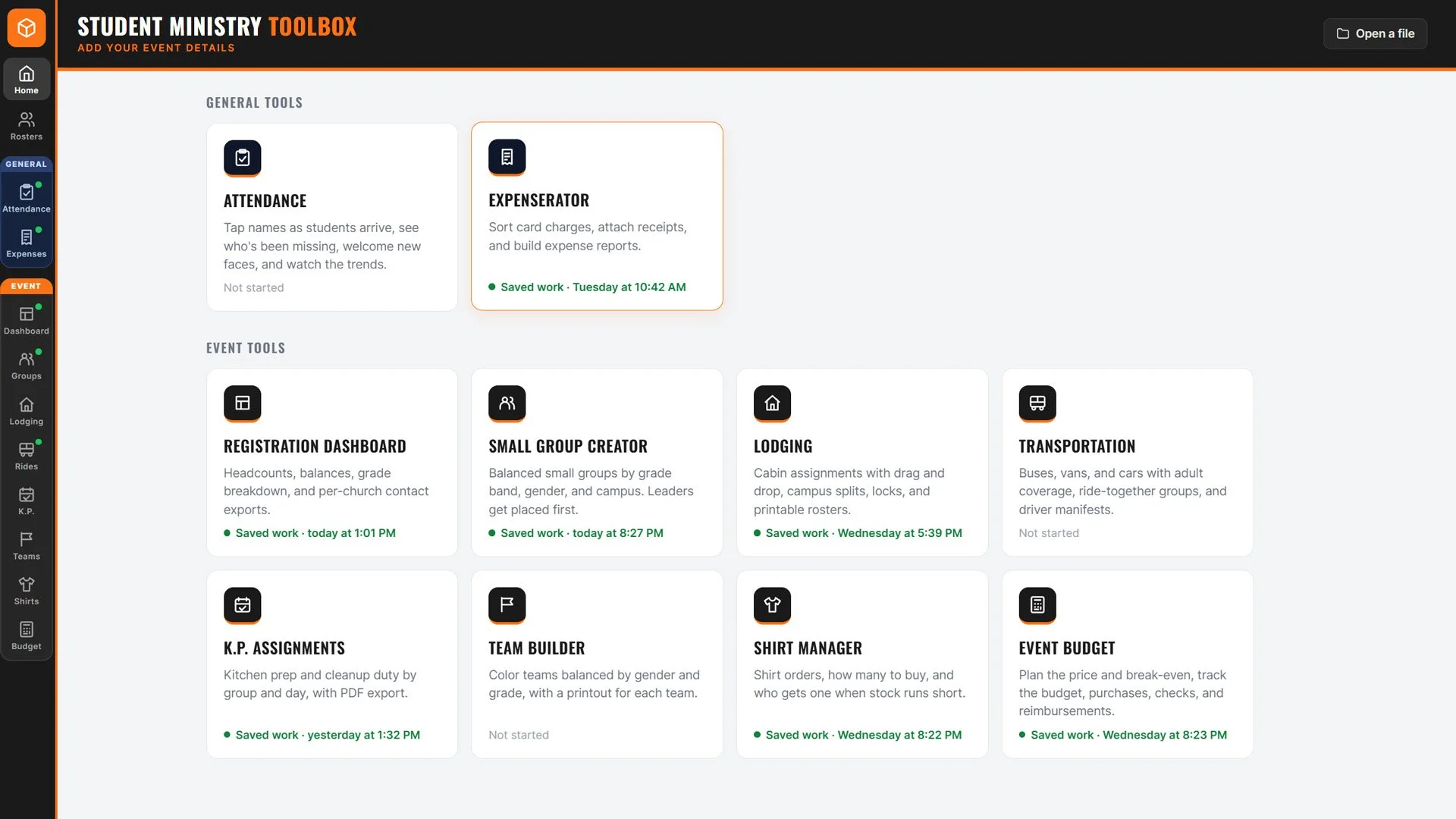
Ten tools for everyday ministry and the events you’re planning. Import your roster once, then use it across your planning tools.
General Tools
For the week-to-week work.
02 TOOLSAttendance
Know who’s here. Notice who’s missing.
Check students in, welcome new faces, track follow-up, and see attendance trends.
Expenserator
Give receipts and reports a place.
Import statements, sort charges with rules and remembered merchant choices, attach receipts, and build expense reports.
Event Tools
For your next camp, retreat, or student event.
08 TOOLSRegistration Dashboard
See student, leader, and staff headcounts, grade breakdowns, and balances owed. Export rosters, leader contacts, and balances by church.
Small Group Creator
Build groups by grade band, gender, and campus, with leaders placed first. Adjust assignments and work late registrants into the plan.
Lodging
Organize cabins by gender, grade, and church. Move individuals or groups, lock finalized assignments, and print cabin rosters.
Transportation
Plan buses, vans, and cars with adult coverage and ride-together groups. Adjust outbound and return trips, then print driver manifests.
K.P. Assignments
Share kitchen prep and cleanup across churches, days, and meals. Adjust and lock assignments, then export or print the schedule.
Team Builder
Create color teams balanced by gender and grade. Keep churches together or mix individuals, make adjustments, and print a sheet for each team.
Shirt Manager
Track sizes, plan your shirt order, and manage late registrations. Set priorities when inventory is limited and print lists by group.
Event Budget
Plan your event price and break-even point, compare the budget with spending, and track purchases, checks, and reimbursements.
Your people, connected across your planning.
Keep permanent Student and Leader Rosters, create separate event rosters, and import CSV or Excel files.
BUILT AROUND YOUR CALLING
The details matter.
Your students matter more.
Behind every camp, retreat, and weekly gathering is a lot of organizing. The Toolbox brings practical help to that work, so you can give your attention to the people in front of you.
02 / GET STARTED
Put the Toolbox
to work.
Get the download or request a license for your ministry. Your next event has enough moving parts. Let’s get them organized.
Your next step
starts here.
Download the Toolbox, unzip the file, and open it in your browser. Try the tools free for 30 days.
Download the ToolboxZIP download · 2.1 MB
30-day full trial · $25 lifetime single-user license
Try every tool free for 30 days. If you want to keep using the Toolbox
after the trial, request a license below. Payment details are handled
directly after your request is received.
Have a license?
Enter your key in Settings, or open the license file you received.
LET’S GET YOUR MINISTRY STARTED
Request a license.
30-day full trial · $25 lifetime single-user license
Try every tool free for 30 days. If you want to keep using the Toolbox after the trial, submit the form below. Payment details will be handled directly after your request is received.
03 / A FEW GOOD QUESTIONS
Before you
get started.
Who is the Toolbox for?
Student pastors and ministry teams managing weekly attendance, follow-up, and expenses, plus the details of camps, retreats, and student events.
What’s included in the Toolbox?
General Tools: Attendance and Expenserator.
Event Tools: Registration Dashboard, Small Group Creator, Lodging, Transportation, K.P. Assignments, Team Builder, Shirt Manager, and Event Budget. Shared Student, Leader, and event rosters keep your planning connected.
Is there a free trial?
Yes. This version includes a 30-day free trial. When you receive a license, enter the key in Settings or open your license file to activate the Toolbox.
How do I open the download?
Unzip the download, then open Student-Ministry-Toolbox.html in your browser. Import a CSV or Excel roster to get started. Keep the file in one place and use the same browser for your saved work.
Where does my work save?
Your work saves in your browser on your computer. Use “Back up everything” to save your rosters, settings, and tool work, including receipts, in one backup file. Make regular backups, especially before moving the app or clearing browser data.
Can I adjust groups and cabin assignments?
Yes. Move people between small groups, or move individuals and whole groups between cabins. Lock finalized cabin assignments as plans come together.
Can I export information for my leaders?
Yes. Export registration rosters, leader contact lists, outstanding balances, cabin rosters, and K.P. schedules. You can also print transportation manifests, team sheets, and shirt lists.
What happens after the free trial?
The Toolbox includes a full 30-day trial with access to every tool. After the trial, a lifetime single-user license is $25. Submit the license request form and payment details will be handled directly after your request is received.
How do I request a license?
Use the license request form to share your contact information and church or organization. You can also email brogers@golovelive.com.
Who built this?
I’m Brian Rogers, a student pastor who has spent 22 years in ministry. I built the Toolbox because I’ve learned that my time is better spent sitting across from a student in a discipleship conversation than staring at a spreadsheet. Youth pastors are asked to teach, disciple, lead, plan events, manage registrations, sort lodging, build teams, track expenses, and handle a hundred other details. These tools are meant to take some of that repetitive work off your plate and create a little more breathing room for the ministry, family, and people that matter most.